The Enterprise Panacea: Native BigQuery Bulk Export
For enterprise digital properties with millions of daily impressions, even the Search Console API hits quota barriers.
To solve this, Google introduced BigQuery Bulk Data Export—a native, automated pipeline that streams complete, unsampled search analytics data directly from Google’s internal indexing logs into your private Google Cloud BigQuery dataset every single day.
Setting Up BigQuery Export in 4 Steps
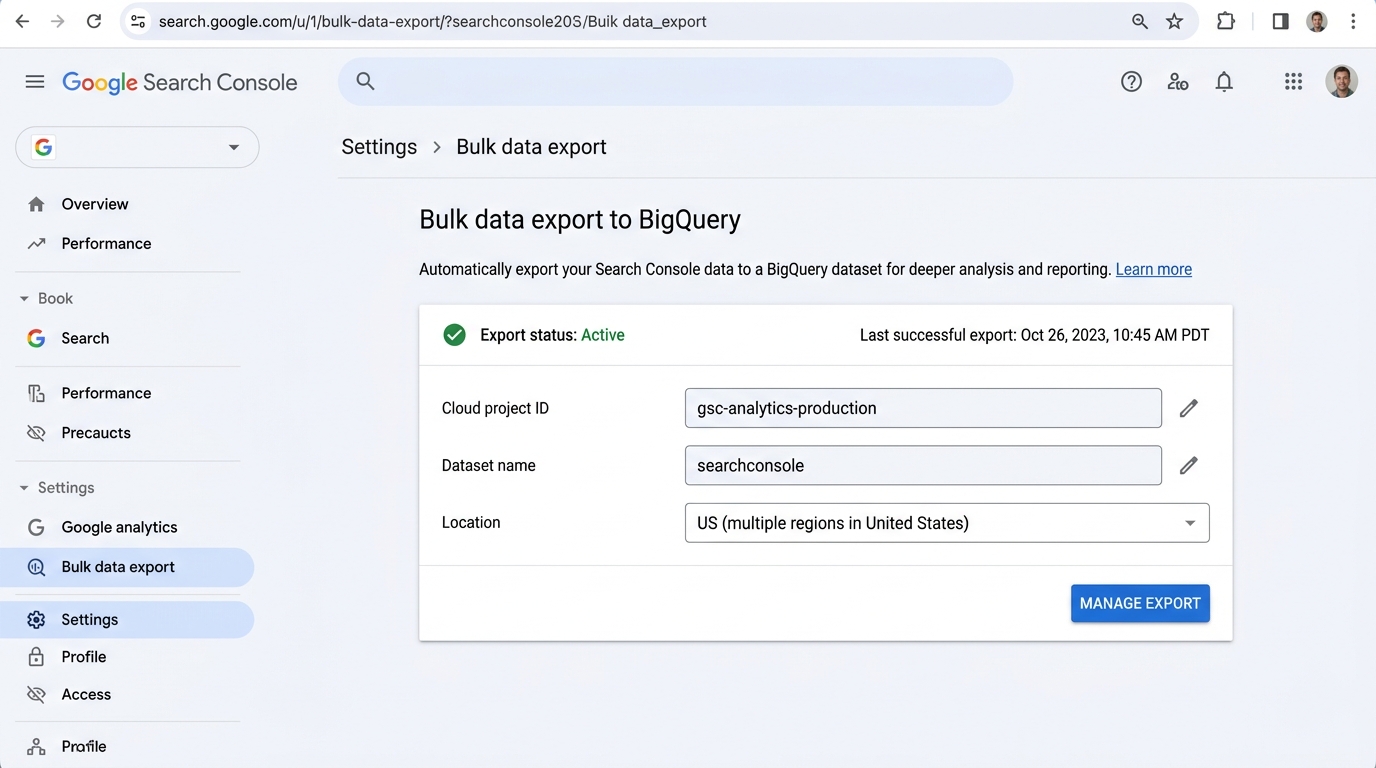 Figure 7.1: The Bulk Data Export settings interface displaying active pipeline status, Google Cloud Project ID connection, target dataset configuration, and multi-region dataset location.
┌────────────────────────────────────────────────────────────────────────┐
│                     BIGQUERY EXPORT SETUP WORKFLOW                     │
│                                                                        │
│  1. Cloud Project: Open Google Cloud Console and enable BigQuery API.  │
│  2. IAM Permissions: Grant BigQuery Data Editor & Job User to:         │
│     [email protected]              │
│  3. GSC Settings: In Search Console, navigate to Settings >            │
│     "Bulk data export" and input your GCP Cloud Project ID.            │
│  4. Dataset Location: Select BigQuery dataset location (US / EU).      │
└────────────────────────────────────────────────────────────────────────┘BigQuery Table Schemas
Once active, Google creates two daily date-partitioned tables in your dataset:
1. searchdata_site_impression
Contains site-level aggregated metrics partitioned by date:
data_date: Date of the impressionsite_url: Your property domainquery: The search termis_anonymized_query: Boolean indicating privacy maskingcountry,search_type,deviceimpressions,clicks,sum_position
2. searchdata_url_impression
Contains URL-level granular impressions:
- Includes all fields above, plus:
url: The exact landing page URL that appeared on SERPsis_anonymized_discover: Discover impression flag
High-Power SQL Queries for SEO Architects
A. Detect Keyword Cannibalization at Scale
Find every query where multiple URLs split impressions over the past 30 days:
SELECT
  query,
  COUNT(DISTINCT url) AS competing_urls_count,
  ARRAY_AGG(STRUCT(url, clicks, impressions) ORDER BY impressions DESC LIMIT 3) AS top_competing_pages,
  SUM(impressions) AS total_impressions,
  SUM(clicks) AS total_clicks
FROM
  `your-project.searchconsole.searchdata_url_impression`
WHERE
  data_date >= DATE_SUB(CURRENT_DATE(), INTERVAL 30 DAY)
  AND query IS NOT NULL
GROUP BY
  query
HAVING
  competing_urls_count > 1
  AND total_impressions > 500
ORDER BY
  total_impressions DESC;
B. Track Query Drift (Year-over-Year New Queries)
Find new queries driving clicks this year that generated zero impressions during the same period last year:
WITH current_period AS (
  SELECT DISTINCT query
  FROM `your-project.searchconsole.searchdata_site_impression`
  WHERE data_date >= DATE_SUB(CURRENT_DATE(), INTERVAL 30 DAY)
),
previous_period AS (
  SELECT DISTINCT query
  FROM `your-project.searchconsole.searchdata_site_impression`
  WHERE data_date BETWEEN DATE_SUB(CURRENT_DATE(), INTERVAL 395 DAY)
                     AND DATE_SUB(CURRENT_DATE(), INTERVAL 365 DAY)
)
SELECT
  c.query AS brand_new_discovered_query,
  SUM(s.clicks) AS current_clicks,
  SUM(s.impressions) AS current_impressions
FROM
  current_period c
LEFT JOIN
  previous_period p ON c.query = p.query
JOIN
  `your-project.searchconsole.searchdata_site_impression` s ON c.query = s.query
WHERE
  p.query IS NULL
  AND s.data_date >= DATE_SUB(CURRENT_DATE(), INTERVAL 30 DAY)
GROUP BY
  brand_new_discovered_query
ORDER BY
  current_clicks DESC
LIMIT 100;
BigQuery Cost Optimization Strategies
Querying billions of rows can quickly consume cloud budget if not properly governed:
- Always filter by
data_date: The tables are partitioned bydata_date. Filtering by date ensures BigQuery scans only the targeted partitions, slashing compute costs by 95%+. - Avoid
SELECT *: Only project the explicit columns needed for your analysis (query,url,clicks).