The Page Indexing Report: Systemic Health Telemetry
While the URL Inspection tool lets you examine one URL at a time, the Page Indexing Report (formerly Index Coverage) provides an aggregate census of every URL Google has discovered across your entire website.
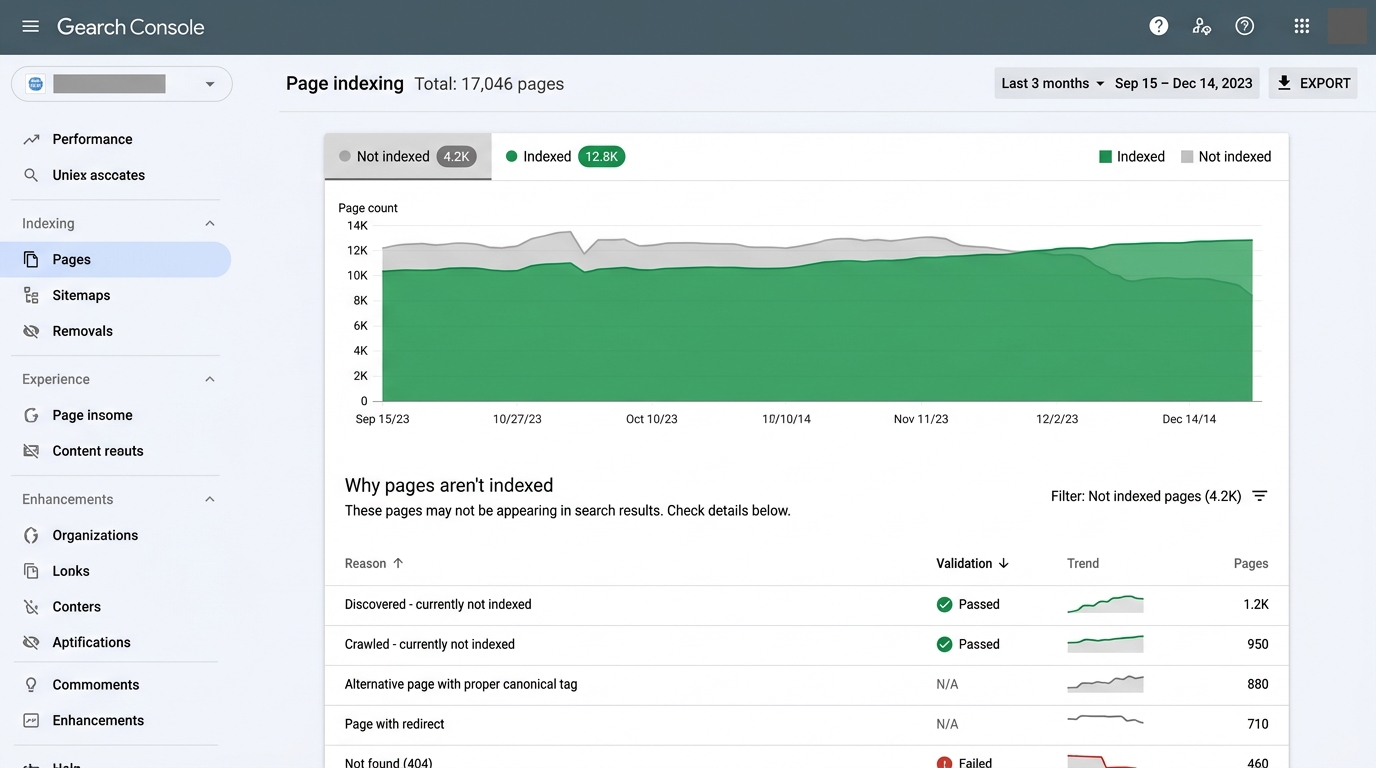 Figure 2.1: The Page Indexing report dashboard displaying the historical ratio of Indexed vs Not Indexed pages, followed by the breakdown of status reasons and validation progress.
In the modern interface, Google divides all evaluated URLs into two primary top-level buckets:
- Indexed Pages: URLs that are currently stored in Google’s index and eligible to appear in search results.
- Not Indexed Pages: URLs that Google has discovered or evaluated, but has deliberately kept out of search results.
The “Why Pages Aren’t Indexed” Spectrum
Not all “Not Indexed” statuses represent bugs! In fact, healthy enterprise websites intentionally keep large portions of their URL space out of the index.
You must categorize every status into one of two mental models:
┌───────────────────────────────────────┬───────────────────────────────────────┐
│        INTENTIONAL EXCLUSIONS         │         CRITICAL TECHNICAL BUGS       │
│        (Working as Designed)          │        (Requires Engineering Fix)     │
├───────────────────────────────────────┼───────────────────────────────────────┤
│ • Page with redirect (301/302)        │ • Server error (5xx)                  │
│ • Alternate page with proper canonical│ • Soft 404                            │
│ • Excluded by 'noindex' tag           │ • Redirect error (loops/chains)       │
│ • Not found (404) for deleted content │ • Duplicate, Google chose different   │
│                                       │ • Crawled - currently not indexed     │
└───────────────────────────────────────┴───────────────────────────────────────┘
Anatomy of the Validation Cycle (“Validate Fix”)
When your engineering team resolves a systemic bug (for example, fixing a database deadlock that was generating 500 Server Error on 1,500 pages), you can initiate a Validation Cycle directly within the issue details page:
[ Click "Validate Fix" ]
            │
            ▼
[ Google runs quick sample test ]
      ├── Sample Fails ──> Validation immediately aborted
      └── Sample Passes ──> Enters "Started" state
            │
            ▼
[ Asynchronous background crawl over 1–4 weeks ]
            │
            ▼
[ Final Verdict: "Passed" OR "Failed" ]Filtering by Sitemap Source
At the top of the Page Indexing report, use the dropdown filter:
- All known pages: Shows every URL Google ever discovered, including legacy URLs, tracking parameters, and external scrapers.
- All submitted pages (Sitemap only): Filters the report to show strictly the URLs listed in your XML sitemaps.